Finger placement on the keyboard
Before starting your typing practice, it’s worth taking a few minutes to learn the basics :) Touch typing begins with proper finger placement and building good habits from the start.
The most important things to focus on are:
- the correct starting hand position
- which fingers should press specific keys
- returning your fingers to the home row
1. Starting hand position
Before typing, place your hands on the keyboard correctly. Your left and right index fingers should rest on the F and J keys.
Most keyboards have small bumps on these keys. They help you find the correct hand position without looking at the keyboard, which is especially useful when typing in low light or on keyboards without backlighting.
The remaining fingers should rest naturally on the neighboring keys:
- Left hand: A, S, D
- Right hand: J, K, L, ;
This position is called the home row and it’s the foundation of touch typing.
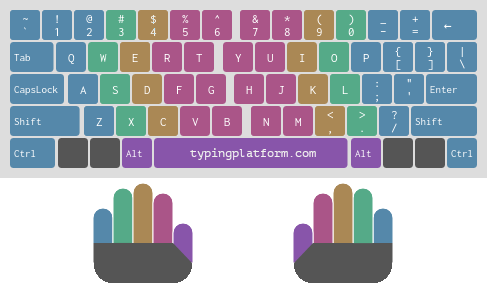
2. Which fingers should press the keys?
Each key on the keyboard is assigned to a specific finger. Use the illustration below as a guide - you do not need to memorize everything immediately.
During exercises on TypingPlatform.com, you can enable hints showing:
- where the key is located on the keyboard
- which finger should press it
Over time, your hands will naturally remember the correct movements. This is known as muscle memory.
The more time you spend learning the basics correctly, the faster touch typing will become automatic. Eventually, every text you type will become practice on its own :)
Some bottom-row keys may vary depending on your keyboard layout, so feel free to use whichever finger feels most comfortable.
For example, if your right Ctrl key is placed below the period key, using your right ring finger may feel more natural. The suggested finger for the space bar is the left thumb, but many people prefer using the right thumb instead.
3. Returning to the home row
One of the most important habits in touch typing is returning your fingers to the home row after pressing each key.
At first, this may seem unnecessary, but it helps build accurate muscle memory and reinforces the movement toward each key.
As your typing improves, some fingers will naturally stay near the home row while others move to nearby keys. This improves orientation and increases typing speed without losing accuracy.
Eventually, you will stop thinking about finger movements entirely. Your hands will automatically know where the keys are located, allowing you to type quickly and naturally without looking at the keyboard :)